


How to Pay for Google Ads with USDT (Step-by-Step Guide)
2026-10-30
While Google Ads does not natively accept direct crypto deposits from a Web3 wallet, you can pay for Google Ads using USDT by linking a crypto debit card like the
Bitget Wallet Card.
Google Ads requires conventional banking networks to clear transactions. When you top up a Bitget Wallet Card with Tether (USDT) or other supported assets like USDC, your balance converts automatically into spendable card funds. Google's billing engine accepts this card directly without triggering the fraud blocks often associated with prepaid cards. Even better, your ad spend can earn up to
3% Assetback paid in Bitcoin, gold, tokenized stocks, or USDC.
Can You Pay for Google Ads with USDT?
Yes, through a crypto debit card. Google Ads does not support direct wallet-to-wallet transfers, but it accepts standard debit cards. Using a
Bitget Wallet Card lets you fund advertising campaigns out of your USDT balance while Google processes the payment over regular card networks.
| Payment Method | Direct USDT Transfer | Bitget Wallet Card |
| Accepted by Google Ads? | No | Yes |
| Payment Rail | Blockchain network (TRC-20, ERC-20) | Standard debit card network |
| How Settlement Works | Manual wallet-to-wallet transfer | Debit card settles against crypto balance |
The Payment Bridge Explained
-
Step 1: Hold USDT (or other supported crypto like USDC) in your Bitget Wallet.
-
Step 2: Top up your Bitget Wallet Card using your crypto balance.
-
Step 3: Google Ads charges the card like a regular bank card during your normal billing cycle.
How Google Ads Handles Card Payments
Before adding your card, check which payment setting your Google Ads account uses:
-
Automatic Payments: Google charges your saved card after your campaigns run—either when your account hits a specific billing threshold (such as $50, $200, or $500) or on your scheduled monthly billing date.
-
Manual Payments: You preload money into your Google Ads account balance before ads launch. Ad delivery automatically pauses when this balance hits zero.
-
Monthly Invoicing: Reserved for large corporate accounts and agencies with approved credit lines from Google.
Debit Cards vs. Prepaid Cards: Google Ads frequently declines virtual and reloadable prepaid cards for automatic billing to prevent fraud. Because the Bitget Wallet Card is issued on standard debit rails, it bypasses these payment filters and works smoothly wherever debit cards are accepted.
How to Pay for Google Ads with Bitget Wallet Card (3 Steps)
Follow this setup to fund your card with crypto and connect it to Google Ads.
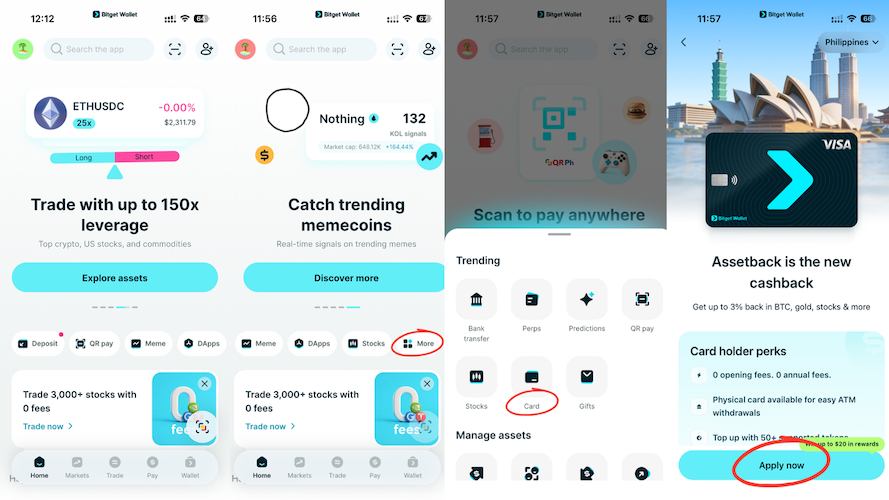
Step 1: Apply for Your Bitget Wallet Card
-
Open the Bitget Wallet app and tap the Card tab.
-
Check if the card is available in your country and tap Apply.
-
Complete the quick identity check (KYC).
-
Once approved, your 16-digit card number, expiration date, and CVV will appear immediately in your app.
For a complete walkthrough of regional access and verification levels, check out the guide on
how to apply for the Bitget Wallet Card.
Step 2: Top Up Your Card with Crypto
-
In the Card section of Bitget Wallet, tap Top Up.
-
Pick USDT (or another supported token like USDC) as your deposit currency.
-
Choose your preferred network (such as Arbitrum, BNB Chain, or TRC-20) to keep network fees low.
-
Enter the amount you want to add, review the conversion details, and confirm the transfer.
Tip: Always keep a small buffer balance on your card beyond your daily ad budget so automatic threshold charges clear without pausing your campaigns.
Need step-by-step deposit instructions? Follow this tutorial on
how to top up your crypto debit card with USDT.
Step 3: Add the Card to Google Ads
-
Sign in to your Google Ads Dashboard.
-
Click Billing in the main navigation menu and choose Settings.
-
Under Payment methods, select Add payment method.
-
Choose Credit or debit card and enter your Bitget Wallet Card details.
-
Save the card. If your account runs on automatic billing, set it as your Primary payment method.
2 Essential Rules for Managing Crypto Ad Spend
-
Card Top-Ups Do Not Automatically Fund Ads: If your Google Ads account uses Manual Payments, adding crypto to your card only prepares the funds. You still need to go into Google Ads and click "Make a Payment" using your saved card.
-
Watch Your Billing Thresholds: With Automatic Payments, Google bills your card the moment your ad costs reach your threshold. Make sure your Bitget Wallet Card holds enough balance so automatic charges clear without disrupting active campaigns.
Earn Up to 3% Assetback on Google Ads Spend
Using the Bitget Wallet Card turns regular marketing expenses into an opportunity to build asset holdings:
-
Base Rate: Earn 2% back on your everyday business purchases and ad spend.
-
Booster Tier: Earn up to 3% back by hitting monthly spending targets or as a new user.
Unlike traditional reward programs that distribute expiring points, Assetback rewards you in real assets:
-
Cryptocurrency: Bitcoin (BTC), USDC
-
Commodities: Tokenized Gold (XAUT)
-
Tokenized Equities & ETFs: S&P 500 ETF, NVIDIA, Tesla, Google
For full reward terms, monthly caps, and tier rules, read the
Bitget Wallet Card Assetback guide.
Frequently Asked Questions
Can I pay for Google Ads directly from a Web3 wallet?
No. Google Ads does not support Web3 wallet logins or direct crypto transfers. You need to route payments through a card like the Bitget Wallet Card to spend your crypto balance.
Does Google Ads accept prepaid crypto cards?
Generally, no. Google's billing system routinely blocks reloadable prepaid cards for automatic charges. The Bitget Wallet Card runs on standard debit rails, giving you the same reliable acceptance as a regular bank card.
Can I top up my card with tokens other than USDT?
Yes. While USDT is the most common choice due to stable pricing and low gas fees across multiple networks, Bitget Wallet Card also supports top-ups with other major tokens like USDC.
What happens if my Bitget Wallet Card runs out of funds?
If Google tries to charge an automatic payment threshold and your card balance is too low, the transaction will decline. Google will alert you and temporarily pause your active ad campaigns until the outstanding balance is paid.
Risk disclosure
Please be aware that cryptocurrency trading involves high market risk. Bitget Wallet is not responsible for any trading losses incurred. Always perform your own research and trade responsibly.
Table of contents
Recommended
 How to Pay for Meta Ads with USDT (Facebook & Instagram Guide)2026-10-30 | 5 mins
 How to Pay for TikTok Ads with USDT Card2026-10-30 | 5 mins
 How to Apply for a Crypto Mastercard2026-01-05 | 5 mins



